
HubSpot for marketing, sales and customer service
HubSpot is a CRM and customer platform bringing marketing, sales and customer service together in one system. Businesses can manage customer data, leads, sales processes, marketing automation and customer service with information organised around the customer.
Systemstöd is a HubSpot Solutions Partner, helping B2B businesses implement, develop and integrate HubSpot with other business systems, including ERP.
How can Systemstöd help with HubSpot?
We help businesses use HubSpot to create connected processes from marketing and sales to customer service and aftermarket operations.
HubSpot CRM
HubSpot CRM implementation and development tailored to company working practices and processes.
Marketing
Marketing automation, lead management and processes for attracting and developing potential customers.
Sales
Sales process development and automation for better structure, follow-up and sales efficiency.
Customer service
HubSpot Service Hub for customer service, support, case management and aftermarket development.
ERP integration
Integration between HubSpot and ERP to create connected information flows between CRM and ERP.
APIs and integrations
API integrations connect HubSpot with other systems and make information available where needed.
Can HubSpot integrate with ERP systems?
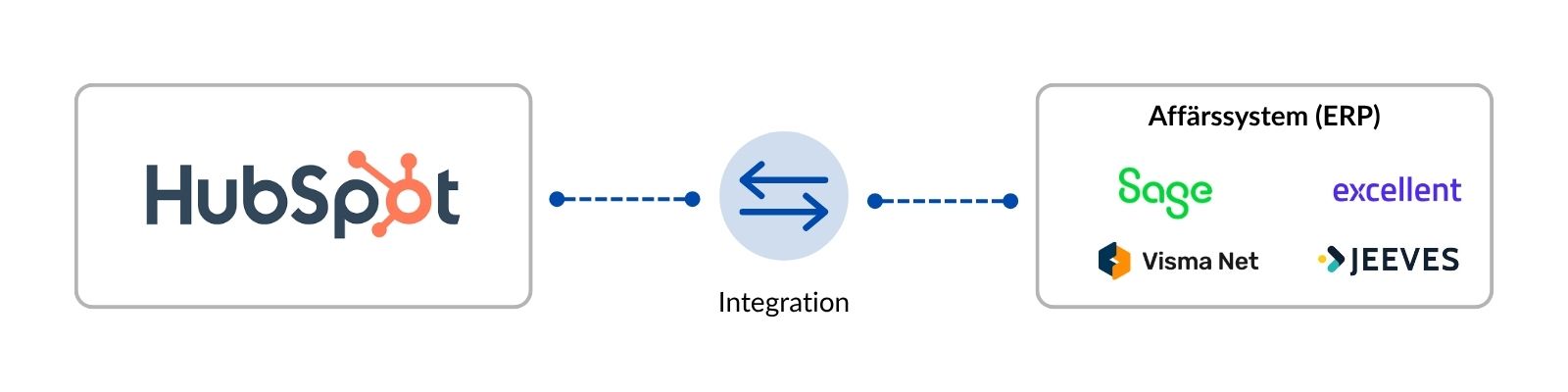
Yes. HubSpot can integrate with ERP to create connected information flows between CRM and ERP, sharing customer, contact, order and other business information between systems.
Systemstöd has extensive experience in ERP and integrations. We work with Sage X3, Jeeves ERP, Visma Net and Excellent, among others, and help businesses connect HubSpot to their ERP system.
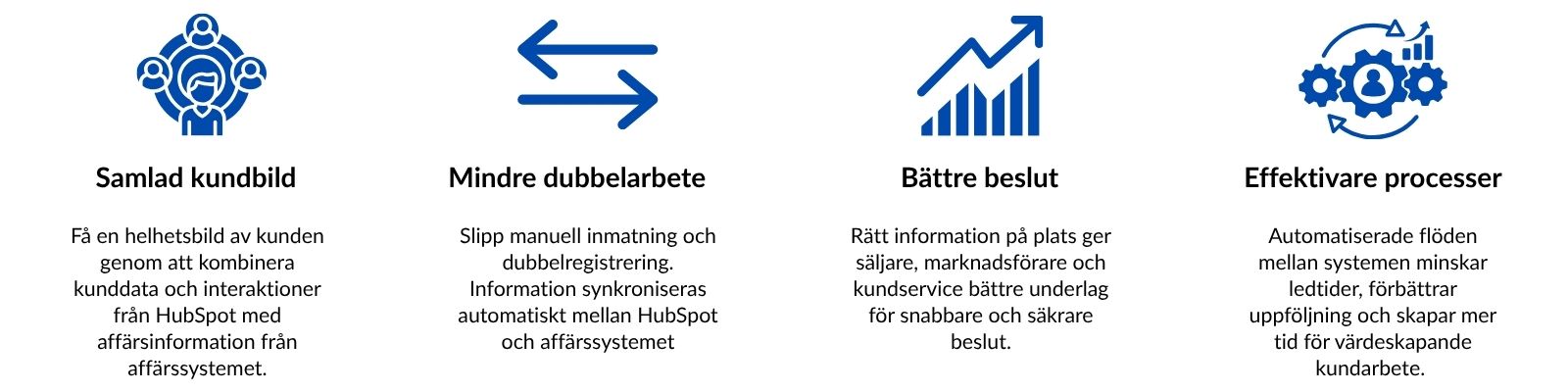
Integration reduces duplicate entry and lets marketing, sales and customer service use relevant customer information in HubSpot while ERP manages business processes.
Why integrate HubSpot with ERP?
HubSpot and ERP have different roles. HubSpot manages customer relationships and marketing, sales and customer service processes, while ERP handles orders, inventory, deliveries and finance, for example.
Integration makes the right information available where needed. A salesperson can access relevant customer and order information in HubSpot without switching between systems, for example.
What is HubSpot and how does the platform work?
HubSpot is a CRM and customer platform bringing marketing, sales and customer service together around shared customer information. CRM is the foundation and can be extended with functions for marketing automation, sales support, customer service, content and reporting.
Collecting customer information, activities and communication in one platform gives marketing, sales and customer service a shared customer view. It reduces information silos and makes it easier to follow relationships from first contact through sales, service and further development.
What can businesses use HubSpot for?
HubSpot manages and develops the whole customer journey, from marketing and leads to sales, customer service and aftermarket operations. Shared information in HubSpot Smart CRM lets different business areas work in the same platform.
Marketing and lead management
HubSpot supports email marketing, forms, landing pages, segmentation, lead management, marketing automation and campaign tracking.
CRM and sales
Sales teams can manage companies, contacts, opportunities, activities and pipelines, automate parts of the sales process and track sales.
Customer service and aftermarket
HubSpot manages customer cases, communication, helpdesk, knowledge base and other service and aftermarket processes.
The functions are available in HubSpot products including Marketing Hub, Sales Hub and Service Hub, with HubSpot Smart CRM as the shared foundation and customer journey.
FOR INDUSTRIAL AND DISTRIBUTION BUSINESSES
Do you work with service, support or aftermarket operations?
Many industrial and distribution businesses have significant potential for better structure, follow-up and business value in service and aftermarket operations.
Discover how to develop your aftermarket operations →
Want to learn more about HubSpot? Book a meeting here!
Would you like to learn more about HubSpot, ask questions or see whether it suits your business? Ask your question or book a meeting here
HubSpot helps you market and sell effectively

Marketing and marketing automation
HubSpot Marketing Hub brings digital marketing, lead management and marketing automation tools into one platform. You can create and track campaigns, forms, landing pages and email marketing based on HubSpot CRM customer data.
Automated workflows nurture and follow up leads based on interest, activity and their stage in the customer journey.
HubSpot Marketing Hub includes functions for:
 Email marketingForms and landing pagesLead managementSegmentationMarketing automationAnalysis and reporting
HubSpot brings marketing and lead management together around shared customer data. Automated workflows help follow up leads, tailor communication and move potential customers through the journey.

Less administration and more efficient sales
HubSpot Sales Hub helps sales teams structure and streamline their work.
Contacts, companies, opportunities, activities and communication are organised around shared customer information in HubSpot CRM.
Sales processes can be tracked in pipelines and recurring activities and follow-ups automated, giving salespeople more time for customers and deals.
HubSpot Sales Hub includes functions for:
Lead managementPipeline and dealsEmail sequencesMeeting bookingAutomated follow-upAnalysis and reporting
Sales teams can collect customer information, opportunities and activities in one place with HubSpot. Automating recurring tasks and follow-ups reduces administration and gives salespeople more time for customer dialogue, deals and sales.

Customer-focused service
HubSpot Service Hub helps businesses bring customer service, support and case management together around the same customer information used in marketing and sales.
Customer cases can be managed and tracked systematically while recurring tasks are automated for faster service and a better customer experience.
HubSpot Service Hub includes functions for:
Customer portalCase managementHelpdeskKnowledge baseChat and customer communicationCustomer feedback
When customer service uses the same information as marketing and sales, it is easier to understand customer history and provide relevant service.
This creates a connected customer journey from first contact through sales, support and the ongoing relationship.
AI in HubSpot – how Breeze works for marketing, sales and customer service

HubSpot Breeze is built-in AI helping businesses create content, find and summarise information, automate tasks and work smarter with HubSpot data. Integrated AI functions can use CRM, customer conversations and deal information as their basis.
Breeze is used throughout the customer journey, from marketing and leads to sales and customer service. Here are practical examples of HubSpot AI in Marketing Hub, Sales Hub and Service Hub.

AI in HubSpot Marketing Hub
HubSpot Marketing Hub uses AI to help marketing teams create content, work with audiences and automate marketing activities. Combined with HubSpot CRM information, it becomes easier to create relevant communication and follow leads through the journey.
 Create and refine content: use AI to support text, blog posts, emails, landing pages and other marketing content.
Segmentation and audiences: use HubSpot customer and behavioural data to identify and engage relevant audiences and tailor communication.
Automate marketing: combine AI and workflows to follow up leads, manage contacts and automate recurring activities.
Benefits of AI in HubSpot Marketing Hub
 Faster from idea to finished content
More relevant communication for different audiences
Better use of HubSpot CRM information
Less manual work for marketing teams

AI in HubSpot Sales Hub
HubSpot Sales Hub uses AI to help sales teams prioritise, follow up and work more efficiently with leads, opportunities and customer information. AI supports sales activities and reduces time spent on recurring administration.
Prioritise leads and deals: use data and AI to identify the contacts and opportunities most relevant to follow up.
Summarise and enrich information: AI can summarise customer and company information, giving salespeople a better basis for follow-up and customer dialogue.
More efficient follow-up: combine AI and automation to create reminders, suggest next steps and reduce manual sales-process work.
Benefits of AI in HubSpot Sales Hub
Better prioritisation of leads and opportunities
Less manual administration
Better preparation for customer dialogue and follow-up
More time for customers, deals and sales
Breeze Assistant – the AI assistant in HubSpot
Breeze Assistant is HubSpot's AI assistant, helping users find and summarise information, create content and perform tasks directly in HubSpot. It can use relevant HubSpot and CRM information as the basis for answers and tasks.
The video below introduces practical uses of Breeze Assistant.

AI in HubSpot Service Hub
HubSpot Service Hub uses AI to help service teams handle cases, find relevant information and streamline recurring tasks. Combined with HubSpot CRM information, this makes fast, relevant service easier.
AI support in customer service: use AI for help with replies, summaries and information when handling customer cases.
More efficient case management: combine AI and automation to organise cases, follow up customers and reduce recurring manual work.
Better preparation for customer dialogue: use HubSpot information and history for a better overview and more relevant service.
Benefits of AI in HubSpot Service Hub
Faster, more efficient customer case handling
Less manual work for service teams
Better overview of customer information and history
More time for personal, value-adding customer service
Breeze Customer Agent – AI for customer service
Breeze Customer Agent is HubSpot's customer service AI agent, helping answer questions and handle recurring service cases. The video below shows how to scale customer service with AI.
Frequently asked questions about AI and Breeze in HubSpot
What is HubSpot Breeze?
HubSpot Breeze is the integrated AI functionality across the platform, used in marketing, sales and customer service, among other areas.
What is the difference between Breeze Assistant and Breeze Customer Agent?
Breeze Assistant helps users find and summarise information, create content and perform HubSpot tasks. Breeze Customer Agent focuses on customer service, helping manage and answer customer questions.
Can HubSpot AI use CRM information?
Yes. AI can use relevant HubSpot information as its basis, allowing AI to work alongside customer, contact and deal information.
Which HubSpot areas can use AI?
AI functions are available in Marketing Hub, Sales Hub and Service Hub, among others, covering content and audiences through sales work and customer service.
Would you like to know how to use HubSpot AI in your business?
We help you identify which HubSpot and Breeze areas can deliver the most value for your business.
Take the next step with HubSpot
HubSpot brings marketing, sales and customer service together around shared customer information. The greatest value comes when it becomes part of existing business processes and the system landscape.
For businesses already using ERP, CRM or other systems, the next step is more than choosing a new tool. It means deciding where information belongs, how systems should work together and which tasks can be simplified or automated.
When is HubSpot a good next step?
HubSpot can be a good next step when customer information is scattered across systems, salespeople spend too much time on administration or marketing, sales and service lack a shared customer view.
– Website leads are followed up manually.
– Salespeople work with customer information in Outlook, Excel and different systems.
– Marketing and sales work with different customer data.
– Customer service lacks an overview of previous dialogue and activities.
– The business wants to automate recurring activities without changing ERP.
HubSpot and ERP – not either/or
HubSpot need not replace ERP. In many organisations, the systems fulfil different roles.
ERP handles orders, inventory, finance, invoicing and other business processes. HubSpot can support activities before, during and after a deal, such as leads, marketing, sales pipelines, customer dialogue and service.
Integration shares relevant information between systems so employees have the right information where they work.
| ERP systems | HubSpot |
|---|---|
| Orders and deliveries | Leads and contacts |
| Finance and invoicing | Marketing |
| Items and inventory | Sales pipeline and opportunities |
| Business transactions | Customer dialogue and activities |
| Operational processes | Customer service and follow-up |
From first contact to long-term customer
HubSpot supports the whole customer journey from first contact with a potential customer through sales, customer service and further relationship development.
Visitors – attract potential customers through your website, content, campaigns and other digital channels.
Potential customers (leads) – collect contact information and activities to see which people and companies show interest.
Qualified potential customers – use HubSpot information and activities to identify the potential customers most relevant to pursue.
Sales opportunity – let salespeople collect dialogue, activities and deals in a shared sales pipeline and track next steps.
Customer – keep customer history and relevant information together even after winning the deal.
Service and ongoing customer relationship – manage cases, follow up customers and identify opportunities for further development and upselling.
How to get started with HubSpot
Implementing HubSpot need not change everything at once. Start with the processes most in need, such as potential customer management, sales follow-up, marketing or customer service.
Next, review the information already in your systems, what should be managed in HubSpot and where integration or automation can simplify work.
Some businesses naturally start with marketing and potential customer management. For others, a clearer sales process, more efficient customer service or ERP integration is the most important first step.
Would you like to see whether HubSpot suits your business?
Have a question about HubSpot or want to discuss how it can work with your existing systems and practices? Choose what suits you best.
Ask a question
Have a specific question about HubSpot, CRM, marketing, sales, customer service or integration with other systems?
Book a meeting
Prefer to talk directly? Book a time to discuss your needs and how HubSpot could be used in your business.
HubSpot glossary – CRM, marketing, sales and AI
Here we explain common HubSpot, CRM, marketing, sales, customer service and AI concepts. The glossary helps you understand CRM, potential customers (leads), workflows, marketing automation, Breeze and conversion without unnecessary technical language.

Find a term
A
What is an A/B test?
An A/B test compares two versions of a web page, email campaign or advertisement to see which performs best.
What is AEO?
AEO means Answer Engine Optimization: creating clear, structured content that helps search engines and AI services find, understand and use information to answer questions.
What is a sales opportunity?
A sales opportunity is a potential sale tracked through the sales process. HubSpot manages opportunities in a pipeline from first contact to a won or lost deal.
What is automation?
Automation performs recurring tasks or processes automatically based on rules or events. HubSpot uses it in marketing, sales and customer service.
B
What does B2B mean?
B2B means Business to Business: a business selling products or services to other businesses.
What does B2C mean?
B2C means Business to Consumer: a business selling products or services directly to consumers.
What is HubSpot Breeze?
HubSpot Breeze is the platform's combined AI functionality for creating and summarising content, working with CRM information and automating marketing, sales and customer service tasks.
What is Breeze Assistant?
Breeze Assistant is HubSpot's AI assistant, helping users find and summarise information, create content and perform tasks directly in HubSpot.
What is Breeze Customer Agent?
Breeze Customer Agent is a customer service AI agent helping businesses answer questions and handle recurring service cases.
C
What is CMS?
CMS means Content Management System: a system for creating, managing and publishing website content.
What is content marketing?
Content marketing creates relevant, valuable content to attract and help an audience and develop relationships with it.
What is CRM?
CRM means Customer Relationship Management. A CRM system gathers and uses customer and potential customer information. HubSpot CRM can include companies, contacts, activities, deals and customer dialogue.
What is CTA?
CTA means Call to Action: a prompt to book a meeting, complete a form or read more, for example.
What is CTR?
CTR means Click-Through Rate: the share of people who click after seeing an email or advertisement, for example.
D
What are digital channels?
Digital channels are places where businesses communicate with customers and prospects, such as websites, email, social media and digital advertising.
E
What is email marketing?
Email marketing communicates with customers and prospects through newsletters, campaigns, information and automated follow-up.
What is ERP?
ERP means Enterprise Resource Planning, commonly referring to business systems managing finance, orders, inventory, deliveries and other business processes.
What is an ERP integration?
An ERP integration connects ERP to another system such as HubSpot, automatically sharing relevant information between CRM and ERP.
F
What is a HubSpot form?
A form collects information from website visitors, for example. It can be stored in HubSpot CRM for follow-up, segmentation and automation.
H
What is HubSpot?
HubSpot is a CRM and customer platform for marketing, sales and customer service, bringing customer information and activities into a shared customer view.
What is HubSpot Smart CRM?
HubSpot Smart CRM is the shared CRM foundation where company, contact, activity and deal information is gathered for use across the business.
What is Helpdesk?
A helpdesk gathers, manages and tracks customer cases. HubSpot customer service can handle cases alongside customer information and previous activities.
I
What is inbound marketing?
Inbound marketing attracts and helps potential customers with relevant information and content rather than relying solely on traditional outbound marketing.
What is an integration?
An integration connects two or more systems for automatic information transfer. HubSpot can integrate with ERP, websites and other business systems, for example.
K
What is a contact in HubSpot?
A contact is a person record in HubSpot CRM, containing name, email address, company, activities and previous communication information, for example.
What is conversion?
A conversion occurs when a visitor performs a desired action, such as completing a form, booking a meeting, downloading material or making a purchase.
What is conversion rate?
Conversion rate is the share of visitors completing a desired activity, such as submitting a form or booking a meeting.
What is a customer journey?
The customer journey describes the stages a potential or existing customer passes through, from first contact and research to purchase, service and the ongoing relationship.
What is a customer case?
A customer case is a question, support request or other service activity requiring handling and follow-up. HubSpot can organise cases and link them to customer information.
What is KPI?
KPI means Key Performance Indicator: a metric for tracking results such as new potential customers, sales or customer service response times.
L
What is a lead?
A lead is a potential customer, such as a person or company showing interest by contacting the business or completing a form.
What is lead generation?
Lead generation attracts and establishes contact with potential customers through websites, content, advertisements, forms or campaigns.
What is lead scoring?
Lead scoring assesses and prioritises potential customers based on information, behaviour and activities to identify those most relevant to follow up.
What is a landing page?
A landing page is created for a specific purpose, such as collecting registrations, generating leads or presenting an offer.
M
What is marketing automation?
Marketing automation automates recurring marketing activities based on information, behaviour or events, such as email follow-up or nurturing potential customers.
What is HubSpot Marketing Hub?
HubSpot Marketing Hub includes digital marketing tools such as email marketing, forms, landing pages, segmentation, automation and analysis.
What is a target audience?
A target audience is a defined group of people or businesses an organisation wants to reach through marketing and communication.
O
What is organic search?
Organic search is traffic and visibility from regular, unpaid results in search engines such as Google and Bing.
P
What is a pipeline?
A pipeline shows process stages. HubSpot uses pipelines to track sales opportunities through sales processes and customer cases through service processes.
What is a persona?
A persona is a simplified description of a typical audience member, used to create more relevant marketing, sales and communication.
R
What is retargeting?
Retargeting directs advertising or communication to people who previously visited a website or otherwise interacted with the business.
What is ROI?
ROI means Return on Investment: the return on an investment relative to its cost.
S
What is HubSpot Sales Hub?
HubSpot Sales Hub includes sales tools for contact and company management, sales pipelines, opportunities, meeting booking, follow-up and automation.
What is segmentation?
Segmentation groups contacts or companies by characteristics, interests, behaviour or activity to tailor communication.
What is SEO?
SEO means Search Engine Optimization: improving website content and structure to increase visibility in organic search results.
What is SERP?
SERP means Search Engine Results Page: the results page shown after a search in Google or Bing, for example.
What is HubSpot Service Hub?
HubSpot Service Hub includes customer service and support tools such as helpdesk, cases, knowledge base, customer portal and follow-up.
U
What is a UTM tag?
A UTM tag is added to a link to measure traffic and visitor sources, such as a campaign, newsletter or social media.
W
What is a HubSpot workflow?
A HubSpot workflow automates recurring processes, such as following up a potential customer, updating information, creating activities or triggering actions when conditions are met.
Cannot find the term you are looking for?
Have a question about HubSpot, CRM, AI, marketing, sales or customer service? Ask us and we will help clarify it.