
Operational dashboards
– Gives employees access to information for their own decisions
– Broad, extensive distribution of information, as everyone (many people) sees the information directly
– Technology and systems are secondary! The primary goal is to display and share information online for independent decisions and activities
Operational dashboards
We are seeing growing interest from customers, potential customers and our own employees in more operational dashboards. Information is simply moved out onto the “floor”, so multiple employees see the information in the same dashboard simultaneously. There does not seem to be a good name for this, so we have chosen to call the solution operational dashboards.
Operational dashboards for logistics and warehousing
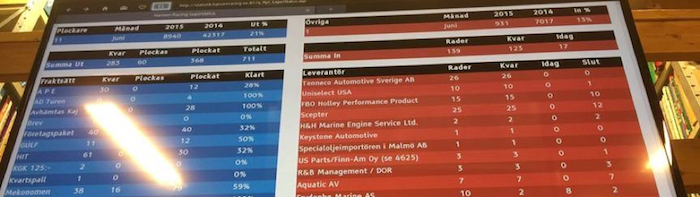
We developed an example of an operational dashboard for logistics and warehousing for our customer Hansen Racing. The company is Sweden's oldest and largest specialist in importing and selling accessories and spare parts for US cars, trucks, vans and marine engines, among other things.
There is a large TV screen in their warehouse. It displays both inbound and outbound delivery information from Jeeves ERP ERP.
Outbound delivery information shows, for example:
– number of picks by shipping method
– carrier
– how many customer orders remain to be picked
– how many customer orders are being picked right now
– how many customer orders are complete.
A warehouse employee who has finished a task can immediately see on this dashboard that inbound deliveries need handling or that customer orders for a particular shipping method need picking – I'll help there!
Employees do not need an “order”; when they finish a task, they can see what needs help next. Staff are simply allowed to decide for themselves where they can be most useful at that moment.
Operational dashboards for support and helpdesk
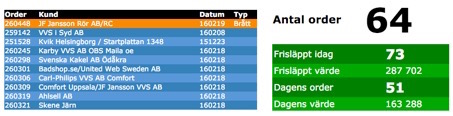
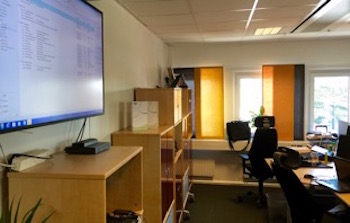
Customer support can also be made more efficient in a similar way. A large TV or monitor is placed centrally in the open-plan office to display incoming support cases. One example is our own customer support at Systemstöd. An employee always has support responsibility each working day.
But if an employee:
– finishes a task earlier than expected
– currently has less to do
– knows a solution to a support case
They can then take one of the incoming support cases displayed on the TV screen. There is no “support manager” assigning cases; employees decide for themselves where they can be most useful at that moment.
Operational dashboards for company information
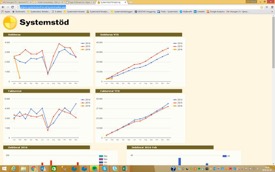
Another example from our own business is company information such as invoicing, utilisation rates and order intake. This information can be displayed in real time for all employees using, for example, Google Charts with a few graphs when they log into Jeeves ERP and the company intranet.
This means all employees always have access to real-time information and status in these areas. Internal meetings can then focus on more demanding tasks rather than reviewing things that have already happened, which the company cannot influence but can only change going forward.
Benefits of operational dashboards
Customers who have started using operational dashboards see major benefits across many businesses.
– Real-time information from Jeeves ERP or other systems is displayed online as a basis for independent decisions and initiatives.
– Extensive, broad distribution of information. Provides broad insight as many people (everyone) see information directly.
– Creates interesting group dynamics because not only the manager but also every employee sees important information. The manager sees how much is being produced, picked, needs resolving, etc., and employees can make their own decisions about what to do and set their own priorities. All based on the information they see.
– Technology and systems are secondary! The primary goal is to display and share information online for independent decisions and activities.