
Role-based workspace
– Create your personal workspace
– Start from one or more predefined pages and create your own workspace
– Use several of the hundreds of gadgets supplied with Sage X3, or create your own
– Visualisation using process maps
– An immediate overview of what you need to monitor, both inside and outside Sage X3
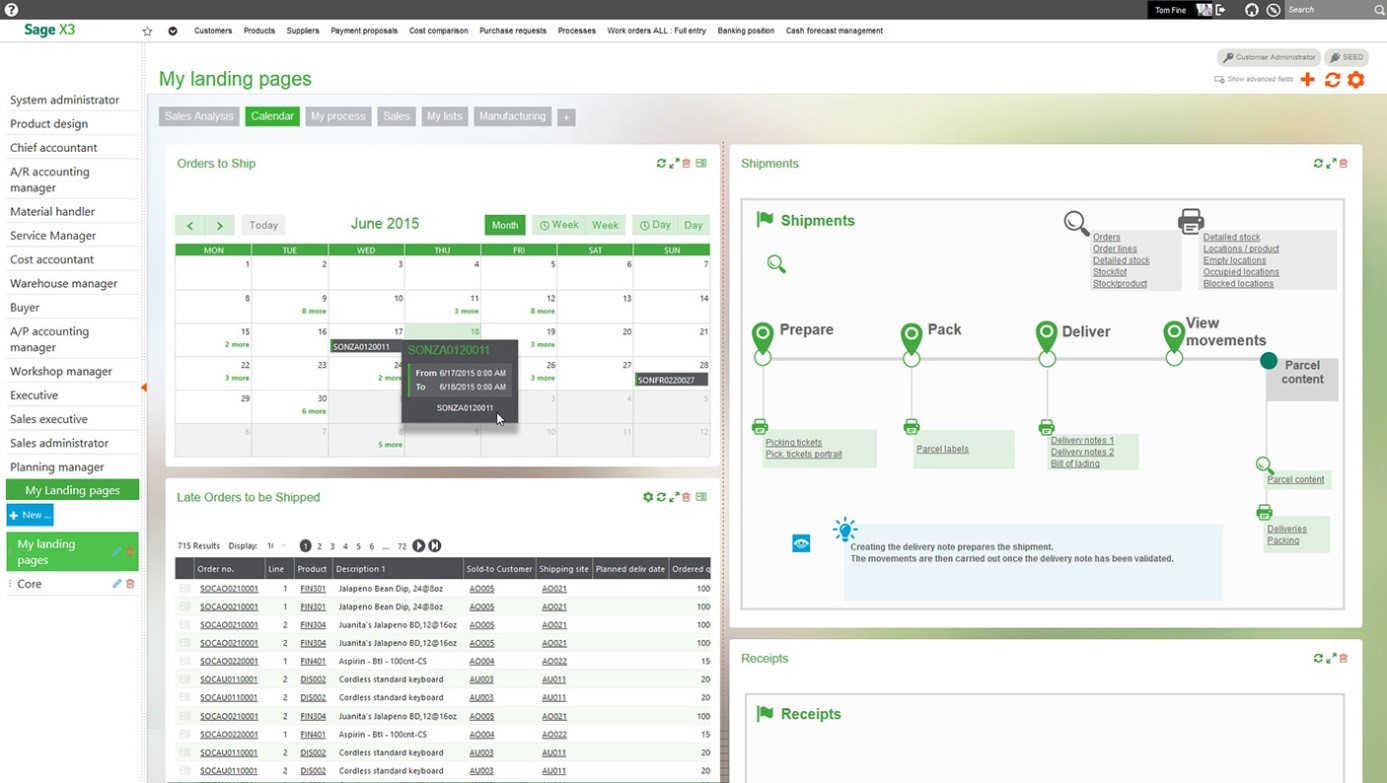
Improve efficiency with the Sage X3 workspace
Improve the usability, productivity and accessibility of your ERP system by providing highly personalised access to relevant tasks for different departments and job roles.
Everyone works differently, so Sage X3 ERP provides an easy-to-use platform that can readily adapt to your way of working. You can customise your dashboard to see the most important information needed to get the job done on time.
Watch a video on customising the Sage X3 interface here
Key features of the Sage X3 workspace
– A personal workspace gives users an immediate overview of critical information and guidance for completing various tasks in their role, using visual process maps.
– Personalised by the user or administrator based on the security rules in place for the role and user.
– Provides access to relevant tasks, internal dynamic data, statistics in tabular or graphical form, calendars, favourite menus, shortcuts to external URLs, notes and documents.
Learn more in the Sage X3 Solution Capabilities Guide here
A guide providing an overview of all modules, functions and product features in Sage X3 ERP.
 Ask your question about Sage X3 ERP here